Overall Flow
Room integration involves your application server, device, and the Tange platform. Your application server checks business permissions and requests short-lived room credentials. The device calls the TiRTC TiRtcWhipConnect API with those credentials. The Tange platform verifies credentials, establishes the room session, and handles audio.
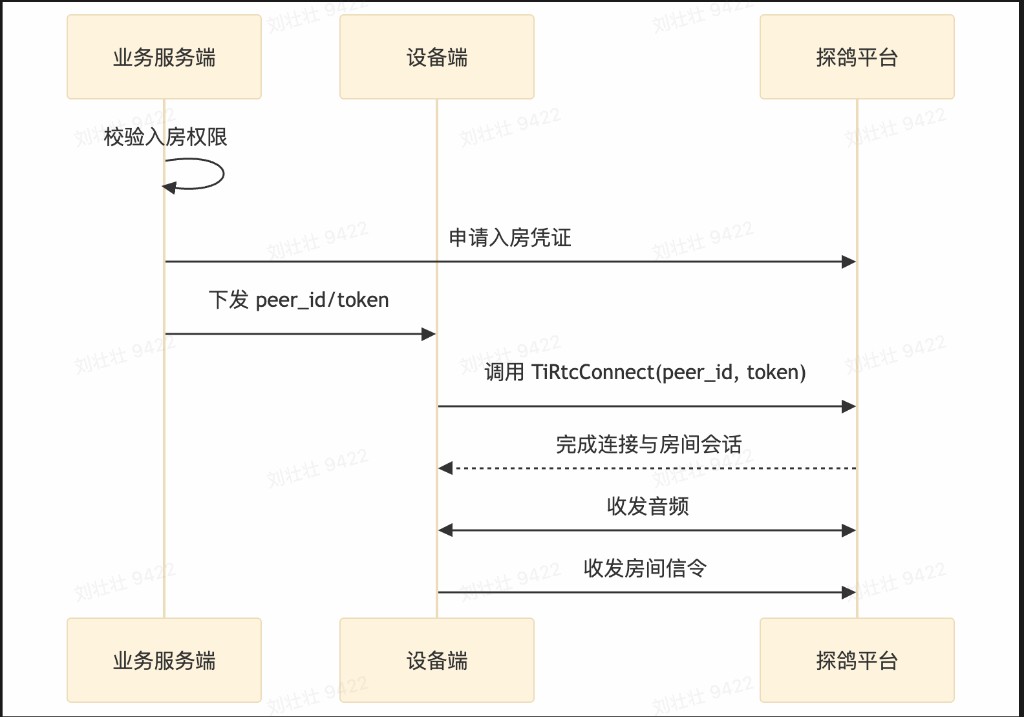
Join Flow
- Your application server confirms that the device can join a business
room_id. - The application server calls
POST /v1/token/roomto requestpeer_idandtoken. - The application server securely sends the short-lived credentials to the device.
- The device calls TiRTC
TiRtcWhipConnectwith thepeer_idandtokendelivered by your application server. - The Tange platform verifies the token and joins the device to the target
room_id. - The Tange platform completes the connection and room session.
- The device starts sending and receiving audio.
- The device sends and receives room signaling through the command channel.
Media and Signaling
Room exposes one TiRTC connection to the integrator:
- The device sends microphone audio through the media channel.
- The device receives room downlink audio through the media channel.
- The device synchronizes room participants and lifecycle events through the command channel.
- The default downlink format is
opus/16k/mono, which is suitable for constrained devices.
Next Steps
- Server Integration: issue credentials and deliver them securely.
- Device Integration: connect through TiRTC and handle room signaling.