Integrate Low-Power Sleep Wakeup
When the device controller enters low-power mode, a sleep module can maintain a TCP connection to a TiRTC sleep wakeup server. A client call or a wakeup request from your backend sends wakeup data over that connection, allowing the module to start the controller and the TiRTC SDK.
Use this flow for devices such as doorbells and cameras that sleep for long periods but must remain reachable for calls or business commands.
Confirm that the device architecture fits before implementing it:
| Device condition | Guidance |
|---|---|
| A separate low-power module remains online while the controller sleeps | Use this integration |
| The controller and network module both power off or lose networking | Not suitable; no remote wakeup can be received |
| The controller and TiRTC SDK remain online | An extra sleep connection is normally unnecessary |
| The module can only match a fixed wakeup packet and cannot parse data | Supported, but use only the default wakeup packet and no custom data |
| Complex business logic must continue during sleep | First verify the module's compute, storage, and network capacity; this guide covers keepalive and wakeup only |
How it works
The following sequence shows only the public integration boundaries. Internal TiRTC services and routing are not part of the device integration contract.
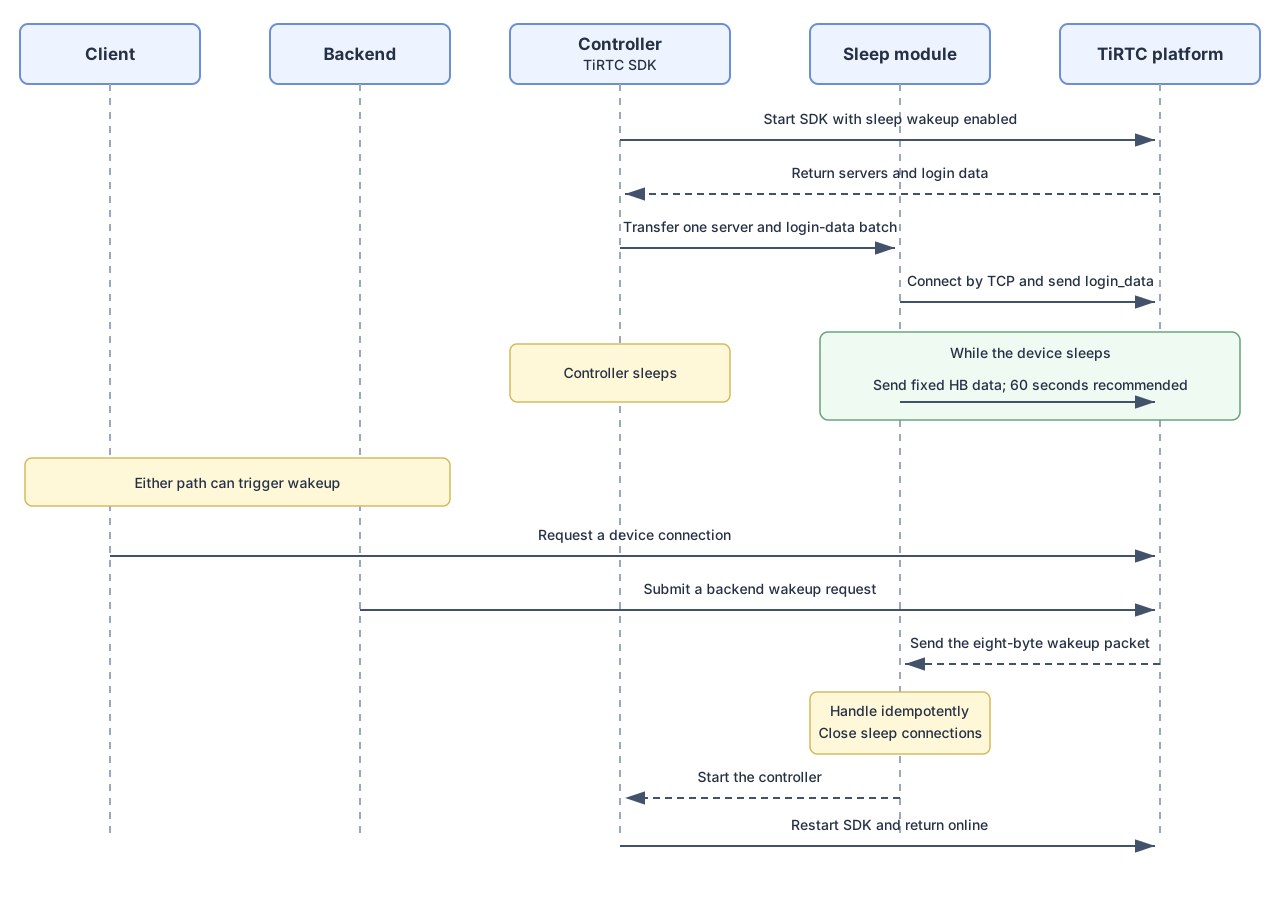
- The controller starts the TiRTC SDK with sleep wakeup enabled.
- The SDK returns server endpoints, login data, and heartbeat data through a callback.
- Before sleep, the controller passes the latest parameters to the sleep module.
- The module connects to one or more returned servers, logs in, and sends heartbeats.
- A client call triggers wakeup automatically. To wake the device for a business event, your backend can submit a wakeup request.
- The module receives wakeup data, closes its sleep connections, and starts the controller.
| Phase | Controller and TiRTC SDK | Low-power module |
|---|---|---|
| Startup | Enable the capability and obtain current parameters | Wait for parameters |
| Prepare to sleep | Deep-copy and transfer one complete parameter set | Validate it, connect, and send login data |
| Sleeping | Stop or enter low-power mode | Send heartbeats, receive wakeups, and reconnect |
| Wakeup received | Not running yet | Start the controller idempotently and close all sleep connections |
| Back online | Restart TiRTC and restore business operations | Stop the current sleep connections and reconnect jobs |
Integrate the SDK
Enable wakeup before TiRtcStart():
int enable_wakeup = 1;
TiRtcSetOption(TIRTC_OPT_WAKEUP, &enable_wakeup, sizeof(enable_wakeup));
Register the callback and deep-copy its complete parameter set before it returns:
static void on_sleep_wakeup_info(const TIRTC_SLEEP_WAKEUP_INFO *info)
{
    save_sleep_wakeup_info(info);
}

static const TIRTCCALLBACKS kCallbacks = {
    .on_event = on_event,
    .on_sleep_wakeup_info = on_sleep_wakeup_info,
};
The callback supplies servers and login_data for the sleep connection. Deep-copy them before the callback returns and replace the complete saved set whenever the SDK returns new parameters. The sleep connection uses a fixed heartbeat protocol: send the two ASCII bytes HB, without a trailing \0, every 60 seconds by default; a device-selected interval must not exceed 300 seconds.
Before saving, validate that the callback and required pointers are non-null, server_count is greater than zero, selected addresses and ports are valid, and the login-data length matches its buffer. Do not let the controller sleep if validation or storage fails.
Use parameters returned after the current SDK startup. Unless TiRTC explicitly confirms that a parameter set can be reused across startups, do not restore old login data after a reboot. Keep the controller online and record the failure when the current startup produces no valid callback.
Wait for both TIRTC_EVENT_SYS_STARTED and valid sleep wakeup parameters before allowing the controller to sleep.
Pre-sleep checklist
- Confirm that no call, stream, or other non-interruptible device task is active.
- Validate and deep-copy the complete parameter set returned by this startup.
- Transfer the servers and login data from the same callback batch to the low-power module, and configure the fixed heartbeat protocol values.
- Wait until the module has established at least one TCP connection and fully sent
login_data. Do not wait for a success response; the server does not send one. - Confirm that heartbeat, receive, and reconnect jobs are running.
- Stop controller-side work that is no longer needed, then enter sleep.
If any step fails, keep the controller online. Never enter a state where neither TiRTC nor a valid sleep connection is available.
Connect to a sleep wakeup server
The SDK can return up to three servers. Connect to at least one available server; you do not have to connect to all of them.
- A single connection is simpler. If it fails, try another returned server.
- Multiple connections can improve path availability, but the same wakeup can arrive on every connection. Make controller startup idempotent.
For each selected server, connect by TCP, immediately send the complete login_data, send the two ASCII bytes HB at the selected interval, and keep reading for wakeup data. Do not include a trailing \0. Successful login has no response. A rejected login returns ERR|<CODE>|<message> and closes the connection.
login_data is valid for seven days. The sleep server checks its expiry only when establishing login state. After login succeeds, the server does not close the existing connection merely because the login data later expires.
If a successfully logged-in connection drops, reconnecting to the same sleep server within five minutes does not recheck the expiry of login_data. Reconnecting after five minutes, or connecting to a different sleep server, performs the normal expiry check. Still send the complete original login_data on every reconnect; the five-minute window does not make the login payload optional.
TCP can write only part of a buffer. Loop until every byte has been sent, and use the declared lengths rather than strlen(). After wakeup begins, close every sleep connection and cancel reconnect work.
Configure finite connect and receive timeouts so a half-open connection or partial packet cannot block forever. After a previously logged-in connection fails, prefer reconnecting to the same server within five minutes so that server can apply its expiry-recheck exemption, but do not retry it in a tight loop. This window does not extend the seven-day lifetime of login_data. Switch to another server from the same callback batch only after reaching the device's configured consecutive-failure or retry-duration threshold. When every server has failed, use capped exponential backoff with jitter; choose timeout and backoff values according to the device's network and power budget. A valid wakeup on any connection must cancel all connection and reconnect jobs.
Heartbeat interval behavior
- The fixed recommended interval is 60 seconds. Use it when no device-specific tuning is required.
- The fixed maximum interval is 300 seconds. A device may tune its sending period for power or network conditions, but it must not exceed 300 seconds.
The sleep server does not need to know which interval the device selected and does not use the 300-second maximum as a disconnect timeout. Receiving login data, a heartbeat, or another packet updates the connection's last-received time. The server does not immediately close a connection merely because the gap between packets exceeds the maximum heartbeat interval. It closes a connection only after receiving no packet for more than four hours.
Continue sending heartbeats at the selected interval. Treat the four-hour cleanup as a server-side stale-connection safeguard, not as a replacement for device-side send-failure detection and reconnection.
Wakeup packet
After login, the server sends a fixed eight-byte wakeup packet:
| Bytes | Value | Description |
|---|---|---|
| 1–6 | 98 3b 16 f8 f3 9c | Fixed wakeup packet identifier |
| 7–8 | Two bytes of custom data | 00 00 by default; configurable through the backend wakeup API |
The default packet is:
98 3b 16 f8 f3 9c 00 00For example, custom_data: "0x1234" produces:
98 3b 16 f8 f3 9c 12 34Both packets use the same protocol and wakeup flow; only the final two bytes differ. Always recognize the packet and trigger idempotent wakeup first. Read the final two bytes only when your product uses them as a short reason code or command. Do not use custom data as the only validity check or assign a fixed business meaning to the default 00 00 value.
Choose handling according to the module's capabilities:
| Module capability | Packet handling | Backend wakeup requirement |
|---|---|---|
| Programmable and able to parse received data | Validate the fixed six-byte prefix and optionally parse the final two bytes | You may omit custom_data or send a two-byte custom value |
| No parsing capability; hardware can only match one fixed packet | Configure the complete default packet 98 3b 16 f8 f3 9c 00 00 as the wakeup pattern | Always omit custom_data so TiRTC sends the default packet |
A fixed-pattern device cannot recognize a packet carrying custom data. For example, 0x1234 changes the final bytes to 12 34, so the packet no longer matches the configured default and might not wake the device. Manage custom-data support as a device-model or product capability, and check it before the backend submits a wakeup request.
TCP is a byte stream, so one recv() call is not guaranteed to return all eight bytes. Accumulate bytes until the complete wakeup packet is available before reading its custom data, while retaining handling for ERR|<CODE>|<message> responses.
For a programmable module, parse the final two bytes in high-byte-first order after validating the fixed six-byte prefix:
static uint16_t parse_custom_data(const uint8_t wakeup_packet[8])
{
    return ((uint16_t)wakeup_packet[6] << 8) |
           (uint16_t)wakeup_packet[7];
}
The default packet produces 0x0000; a packet ending in 12 34 produces 0x1234. Pass the parsed value to the controller only after idempotently accepting the wakeup packet.
Call the server APIs
After the module has logged in and started heartbeats, your backend can query observed connectivity for integration diagnostics or submit a wakeup request for a business event. The query does not report final device business state. If the module only matches a fixed packet, omit custom_data from the wakeup request.
See Server APIs for authentication, complete parameters, and response semantics. Client-call wakeup does not require your backend to call these APIs.
Verify the integration
Confirm that the SDK returns valid parameters, the sleep module logs in to at least one server, heartbeats continue, client calls and backend requests wake the controller, and all sleep connections close after wakeup. If you connect to several servers, verify that duplicate wakeup data starts the controller only once. Also test unreachable servers, capped reconnect backoff, partial packets, half-open TCP connections, network changes, pending reconnect cancellation, and duplicate wakeups during startup.
For diagnostics, record the device ID, request ID, server address, connection index and phase, connect and disconnect times, socket error, most recent heartbeat, consecutive reconnect count, and the final two wakeup bytes. Record server error codes and messages for rejected logins, but never log raw login data or credentials.