Connect a Coze Agent through TiRTC
This guide walks through the complete working path: a device sends microphone audio to Tange through TiRTC, Tange connects to your Coze agent, and the agent's voice response returns to the device over the same TiRTC connection.
Follow the steps in order for your first integration.
Architecture

There are four responsibilities:
| Component | Responsibility |
|---|---|
| Coze console | Create the agent and an API Key. |
| Tange role configuration | Store the Coze credential and bot_id, then provide a role_id. |
| Application server | Request a short-lived peer_id and token for device_id + role_id, then deliver them to the device. |
| Device | Connect with TiRTC, send start_session, upload microphone audio, and play response audio. |
Do not confuse these IDs:
bot_idis the Coze agent ID and is used only in the Tange role configuration.role_idis the Tange role ID and is used to request credentials and start a session.device_ididentifies the registered Tange device.
Prerequisites
- You can sign in to the Coze console.
- You have a Coze agent that can answer correctly and you have recorded its
bot_id. - You have created a Tange application and device and have the Tange
AppId. - Your application server can call Tange server APIs.
- The device has integrated the TiRTC SDK and can connect, exchange audio, and exchange commands.
If TiRTC is not working yet, finish Device Integration first.
Step 1: Create a Coze agent and API Key
Create and test the agent
If you have not created a Coze agent before, start with the Coze Agent Quick Start.
- Create the agent in Coze.
- Verify the conversation in the Coze debugging page.
- Make sure the agent is available to API calls. Publish it first if required by the console.
- Record its
bot_id; the agent name is not thebot_id.
Create the credential
Open the Coze Playground authorization page, then open API & SDK → Authorization → Service identities and credentials to create an API Key. Grant only the permissions needed to call the target agent and real-time voice APIs. Copy the API Key immediately and keep it only on the server.
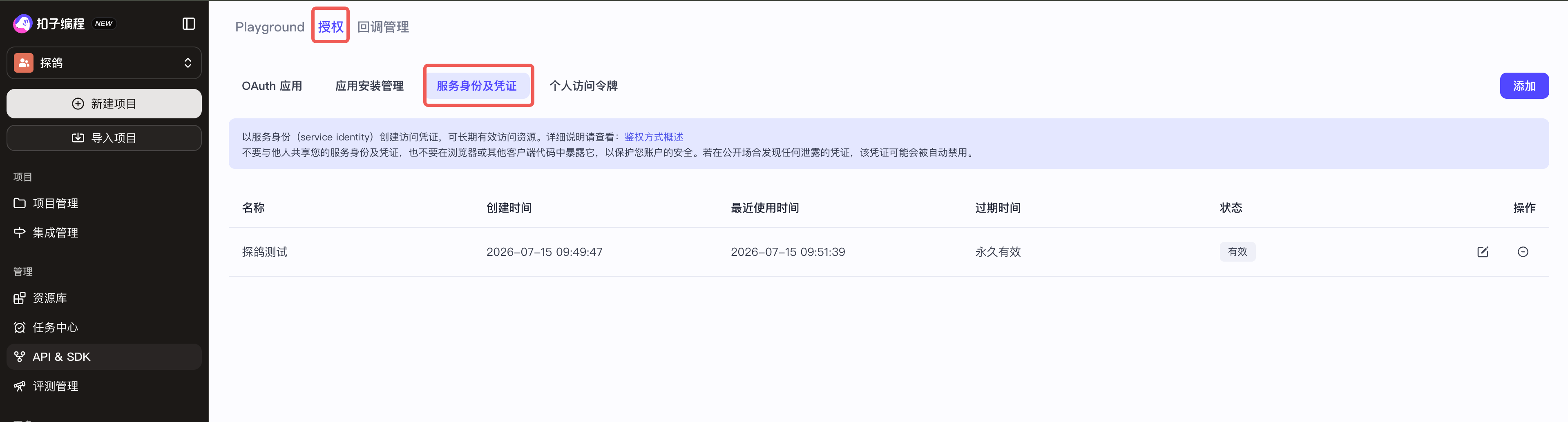
The red boxes mark Authorization and Service identities and credentials. On this page, click Add in the upper-right corner.
Save this value immediately:
| Coze credential value | Tange role field |
|---|---|
| API Key | service_config.config.api_key |
Step 2: Create a Coze role in Tange
Follow the Create Role API documentation. Set the role type to coze, provide the Coze api_key and bot_id, then create the role.
Store the returned role_id; it is required when requesting connection credentials and sending start_session.
Step 3: Request TiRTC connection credentials
The application server uses the same device_id and role_id to request peer_id + token. See Server Integration for the endpoint, signing method, request fields, and error handling.
Deliver only device_id, role_id, peer_id, and token to the device. The device must not construct peer_id or store the Tange AK/SK.
Step 4: Connect and start the session
The device must perform these operations in order:
- Initialize and start the TiRTC SDK.
- Register the audio callback and
on_commandcallback. - Call
TiRtcWhipConnect(peer_id, token, ...). - Wait for the connection callback with
err == 0. - Send
start_sessionon command0x2100. - Wait for the matching successful JSON-RPC response.
- Start sending microphone audio and playing downlink audio according to the formats in the response.
{
  "jsonrpc": "2.0",
  "id": "start-session-001",
  "method": "start_session",
  "params": {
    "device_id": "DEMO_DEVICE_01",
    "role_id": "role_xxx",
    "input_audio": {
      "codec": "opus",
      "sample_rate": 16000,
      "channels": 1
    },
    "output_audio": {
      "codec": "opus",
      "sample_rate": 16000,
      "channels": 1
    }
  }
}
device_id and role_id must exactly match the values used to request peer_id + token. Otherwise the platform returns:
{
  "jsonrpc": "2.0",
  "id": "start-session-001",
  "error": {
    "code": -32602,
    "message": "start_session params do not match WHIP token"
  }
}
Use the audio formats in the successful response as the authoritative session formats.
Step 5: Send and receive audio
The uplink frame format must match start_session.result.input_audio. Decode downlink frames according to start_session.result.output_audio and play them continuously; do not wait for the whole sentence.
Coze event protocol
Audio and control data use separate channels:
| Channel | Content |
|---|---|
| TiRTC audio channel | Coze response audio carried by conversation.audio.delta. |
TiRTC command 0x2100 | start_session responses and all Coze server events except conversation.audio.delta. |
Forwarded Coze events
Coze server events are delivered as follows:
conversation.audio.delta: Tange decodes its audio and sends it through the TiRTC audio channel. Noforwardevent is generated for this event type.- Every other Coze server event: the parsed event object is placed in the
paramsof amethod=forwardmessage exactly once, whether or not Tange also processes it internally. Unknown event types added by future Coze versions follow the same rule.
Example forward message:
{
  "jsonrpc": "2.0",
  "id": "<coze_event_id>",
  "method": "forward",
  "params": {
    "id": "<coze_event_id>",
    "event_type": "conversation.audio.sentence_start",
    "data": {},
    "detail": {
      "logid": "<coze_log_id>"
    }
  }
}
Do not limit the accepted event set to three fixed types. The following table lists common events and suggested actions. The Coze real-time voice protocol version in use remains authoritative for event types and data fields.
params.event_type | Meaning | Recommended action |
|---|---|---|
conversation.audio.sentence_start | Coze starts generating response audio. | Enter the speaking UI state and prepare the playback buffer. |
conversation.audio.completed | Coze has completed response-audio generation. | Return to listening after the local playback buffer is empty. |
conversation.chat.canceled | The current Coze chat was canceled. | Stop and clear buffered response audio immediately. |
conversation.audio_transcript.update / conversation.audio_transcript.completed | Coze returns an incremental or complete speech transcript. | Read the native event when captions are required; do not wait for generic caption. |
conversation.message.delta / conversation.message.completed | Coze returns an incremental or complete message. | Display or log it as required by the product. |
conversation.chat.completed / conversation.chat.failed | The current chat completes or fails. | Update session state and record failure details. |
chat.created, chat.updated, conversation.chat.created, conversation.chat.in_progress | A chat is created, updated, or enters processing. | Usually log the state; update the UI if needed. |
input_audio_buffer.speech_started / input_audio_buffer.speech_stopped | Coze server VAD detects that the user started or stopped speaking. | Update the listening state if needed. |
| Other events | Other current or future Coze server events. | Preserve and log the received params, then handle it according to the Coze protocol version in use. |
The top-level id correlates the Coze event. The device does not need to send a JSON-RPC response for downlink forward events.
Current adapter limitations
Native Coze transcript and other events are delivered through forward, but they are not automatically converted into generic AI Chat caption, round_start, round_end, or device_action events. Read forward.params.event_type and follow the Coze protocol version in use when the product needs these capabilities.
Unified downlink forwarding does not mean that generic device-to-server controls with similar names are automatically converted into native Coze client events:
| Device method | Current Coze behavior |
|---|---|
start_session | Supported and required. |
end_session | Supported; closes the current Tange and Coze session. |
forward | Supported; forwards params as a native Coze client event. This is an advanced feature. |
interrupt / interupt | Reaches the third-party engine but is not directly mapped to a native Coze cancel event. |
submit_speech | Not directly mapped to a native Coze client event; the default path relies on Coze server VAD. |
update_config | Not directly mapped to Coze chat.update and does not dynamically change the current Coze configuration. |
If native Coze control is required, send a forward message whose params exactly matches the Coze real-time protocol version in use:
{
  "jsonrpc": "2.0",
  "method": "forward",
  "params": {
    "id": "coze-client-event-001",
    "event_type": "<native Coze client event type>",
    "data": {}
  }
}
See Event Protocol for the common JSON-RPC format and other AI Chat service types.
Minimum acceptance test
- Verify the agent directly in the Coze debugger.
- Create the Coze API Key and verify that
api_keyandbot_idare present. - Create the Tange
cozerole and store itsrole_id. - Request
peer_id + tokenwithdevice_id + role_id. - Confirm that the TiRTC connection callback reports
err == 0. - Send
start_sessionand receive a successful response with the sameid. - Send clear 16 kHz mono speech continuously.
- Confirm that downlink audio is received and played continuously, and log
forwardevents for diagnosis.
Once step 8 succeeds, the minimum path is complete. Validate captions, interruption, dynamic configuration, and device plugins separately only if your product requires them.
Troubleshooting
start_session params do not match WHIP token
The device_id or role_id in start_session differs from the value used to request peer_id + token. Do not reuse credentials from another device, role, or old session.
Connected, but no response
Check the following in order:
start_sessionsucceeded.- The uplink codec, sample rate, channels, and TiRTC frame flags agree.
- The Coze
bot_idis correct and the agent is available through APIs. - The Coze API Key has the required target-agent and real-time voice permissions.
- Platform logs do not contain Coze authentication or WebSocket errors.
Events arrive, but there is no sound
Receive sound from the TiRTC audio callback, not from forward. Decode it with start_session.result.output_audio.codec and play it continuously.
Audio works, but caption does not arrive
This is a current Coze adapter difference. Native conversation.audio_transcript.update and conversation.audio_transcript.completed events are delivered through forward, but they are not mapped to generic caption. Read the native events when captions are required, and do not use caption as the success condition for Coze audio.
Coze continues after interrupt
The current adapter does not translate the generic interrupt method into a native Coze cancel event. The device may stop local playback immediately, but server-side cancellation requires a supported native Coze event through forward or a future formal mapping.
Production checklist
- [ ] The Coze agent is tested and available through APIs.
- [ ] The Coze API Key follows least privilege and is stored only on the server.
- [ ] The Tange role type is
coze, and the correctrole_idis stored. - [ ] The application server requests
peer_id + token; the device never constructs them. - [ ]
start_session.device_id + role_idexactly match the credential request. - [ ] The device sends and receives audio according to negotiated formats.
- [ ] The device plays
conversation.audio.deltafrom the audio callback and does not wait for a same-namedforwardevent. - [ ] The device receives and logs all
forwardevents and handles the requiredparams.event_typevalues. - [ ] The product reads native Coze events without depending on generic mappings such as
caption. - [ ] Network loss, failures, cancellation, and normal exit all use idempotent cleanup.