WeChat Mini Program application and configuration
This guide covers creating a Mini Program on the WeChat platform, enabling hardware device and WeChat VoIP calling capabilities, and configuring the message channel to your business server. UI and procedures may change; always refer to WeChat official documentation.
Prerequisites:
- WeChat Mini Program registration completed (individual or enterprise entity, with real-name verification)
- WeChat DevTools installed
- HTTPS server reachable on port 443
1. Mini Program and hardware device capabilities
Create the Mini Program and enable hardware device capabilities to obtain the device permissions required for WeChat VoIP calling.
1.1 Steps
Step 1: Open the WeChat developer console
- Official URL: WeChat Official Accounts Platform (Mini Program login).
- Sign in with a registered, verified Mini Program account (you need Development or admin permissions).
Step 2: Enable hardware device capability
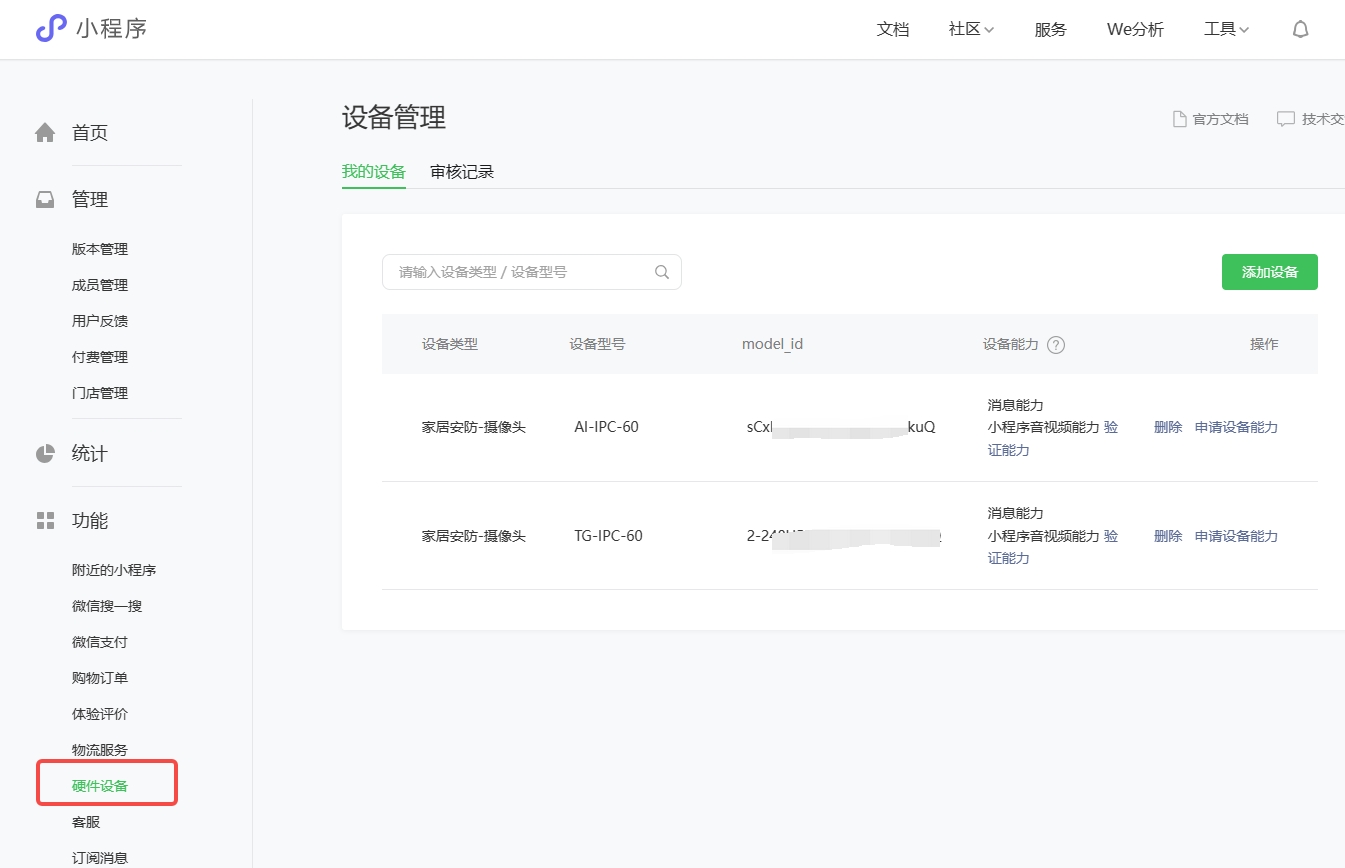
- In the console, open Industry capabilities → Hardware device → Enable.
- Follow WeChat’s guide and supply required information and qualifications. Reference: Hardware device capability guide (always use the latest official page).
- After submission, WeChat usually reviews within 1–3 business days; track status under Hardware device → Review records.
Step 3: Add a device and apply for WeChat VoIP calling capabilities
After approval, go to Hardware device → Device management → Add device.
Fill in device information consistent with your real product (otherwise capabilities may be rejected):
- Device type: Choose the category that matches your product (for example home security — camera).
- Device model: Match the nameplate or public model (for example
AI-IPC-60,TG-IPC-60). model_id: Assigned or generated by WeChat—save it; development and Mini Program calling require it.
Select the capabilities available in the console—typically including Mini Program audio/video for WeChat VoIP calling and verification (device legitimacy).
Submit and track review under Device management → Review records.
2. Configure Mini Program message push
Configure the channel from WeChat to your business server so WeChat VoIP calling events (calls, call state, and so on) can be delivered.
2.1 Steps
Step 1: Open message push settings
- WeChat Official Accounts Platform → Development → Development management → Development settings.
- Find Message push and click Modify (if never enabled, Enable first).
Step 2: Fill in parameters
| Setting | Description |
|---|---|
| URL (server address) | Your callback URL |
| Token | Custom secret (prefer a strong random string, for example 32 characters) used to verify signatures |
| EncodingAESKey | Required in safe mode; you can click Random and store it securely |
| Message encryption mode | Prefer Safe mode |
| Data format | XML |
Submit and complete verification.
Step 3: Complete WeChat verification
- After parameters are filled, click Submit. WeChat sends a GET verification request to your URL (
signature,timestamp,nonce,echostr, and so on). - Before submit, ensure your service is configured with the matching
appId,appSecret,token, andEncodingAESKey. - If your server returns
echostrper WeChat’s rules, configuration succeeds. If not, check public HTTPS reachability, certificate, and that Token / EncodingAESKey match.
2.2 Notes
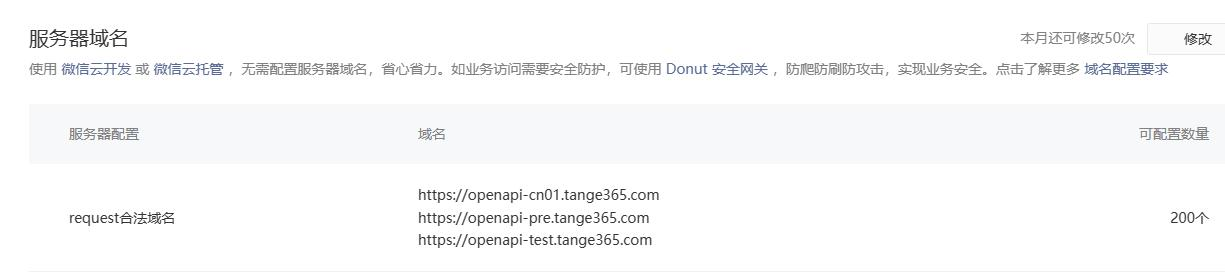
- The URL must be HTTPS; your Mini Program request legal domain list must include the domain you actually use.
- If your data center or WAF uses IP allowlists, add WeChat’s server IP ranges so verification and event delivery are not blocked.
- After you modify and submit message push settings, the previous configuration stops working; validate in a test environment before production.
3. Device submission for review (Tencent requirements)
Before hardware devices and WeChat VoIP calling capabilities go live, follow Tencent’s submission and compliance process, for example:
Follow WeChat’s current submission docs, category rules, and review outcomes, and plan for review lead time.